
 v1.15.0 Release Notes
Zadig v1.15.0 was released on September 30, 2022.
# Feature List
Developer Experience
- Support Zadig mobile version
- Support local Zadig installation
- Support custom workflow API
- Frontend interaction and style optimization
Workflow
- Custom workflow supports test tasks
- Custom workflow supports native Kubernetes deployment
- Custom workflow supports notifications
- Custom workflow supports collaboration mode
- Custom tasks support enumeration types
- Custom workflow supports timers
Others
- Explicit support for AWS resources (object storage, K8s clusters, image registries)
- K8s YAML templates support go template format
- Library upgrades to improve code security
Bugfix and Optimizations
- Custom workflow name length optimization
- Fixed issue where code repository cannot be selected when configuring workflow triggers using build templates
- Fixed issue where workflow build configuration includes non-existent services
- Fixed issue where disabled packages cannot be edited in the system
- Fixed issue where code pulling fails when code source URL contains Path
- Fixed issue where workflow branch filtering is not applied when clicking workflow upgrade in environment
- Artifact deployment workflow editing no longer depends on service build configuration
- Helm Chart project services created using templates support editing values.yaml
# Business Change Notice
Notice
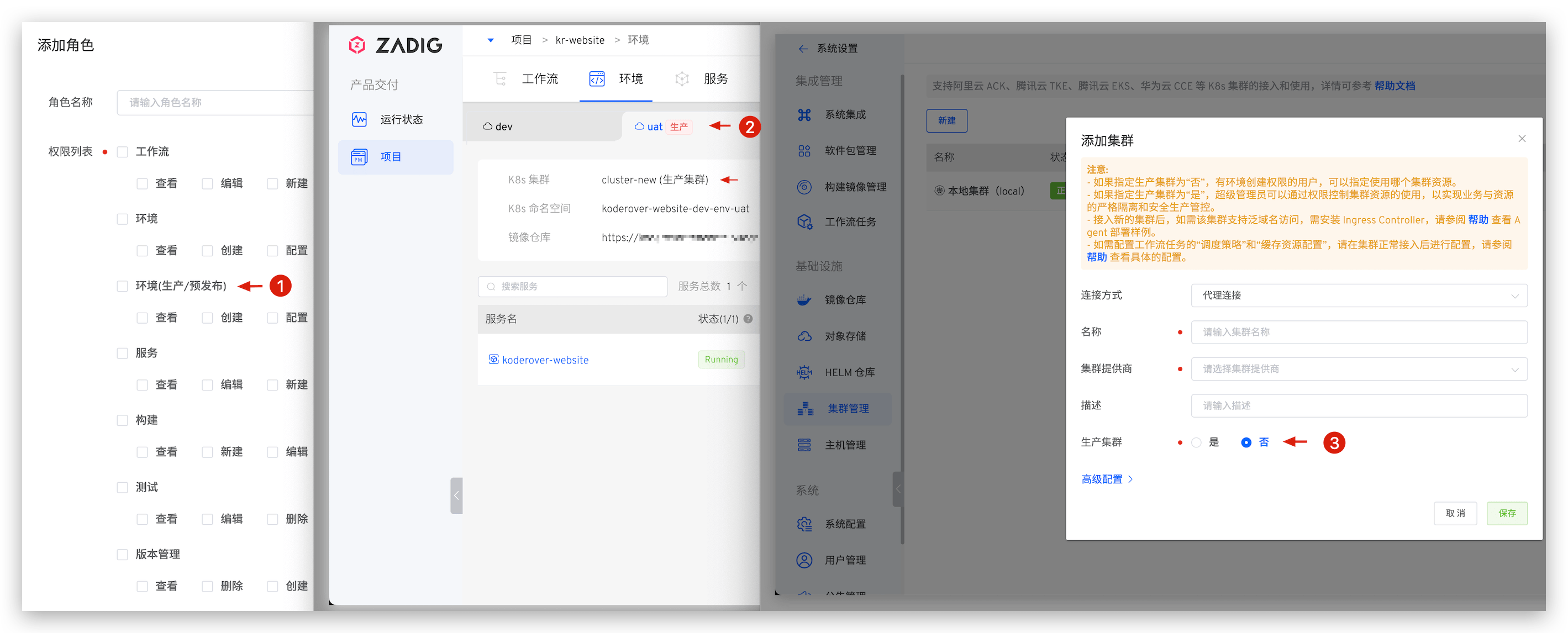
To implement more secure and fine-grained ABAC permission management, this version makes the following business adjustments for production/pre-release environments. Please read carefully before upgrading.
# Change Scope
- In project permission management, removed
environment (production/pre-release)related configuration items from "Role" -> "Permission List". - Removed
productionlabel andproduction clusterinformation from "Project" -> "Environment" page. - Removed production cluster identification related configuration from "System Settings" -> "Cluster Management".
# Impact Scope
Users with production cluster related permission configurations will have all their environment permission configurations invalidated after upgrade.
# How to Fix
Project administrators should reconfigure permissions for all environments through collaboration mode after upgrade to achieve fine-grained environment permission management. Reference: Collaboration Mode.
# Version Upgrade Process
Important Notes
- This version has business changes, please read the Business Change Notice carefully before proceeding with upgrade operations
- If current system version < v1.14.0, please first upgrade to v1.14.0. For specific upgrade process, see v1.14.0 Upgrade Method, then follow the method below to upgrade to v1.15.0
- This version upgrade involves basic component updates. If you use Zadig's built-in MongoDB, MySQL, MinIO object storage components, please be sure to follow the upgrade guide to backup/restore data
# Database Backup
If already in production use, be sure to backup the database before upgrading
# High Availability Database
If using external high availability database for data storage, database backup and restore operations are as follows:
- Database backup commands:
- Backup MongoDB data
mongodump -h IP --port PORT -u USERNAME -p PASSWORD -d DATABASE -o FILE_PATH
- Backup MySQL data
mysqldump -h <HOST> -P <PORT> -u root -p user > user.sql
mysqldump -h <HOST> -P <PORT> -u root -p dex > dex.sql
2
- Database restore commands:
- Restore MongoDB data
mongorestore -h IP --port PORT -u USERNAME -p PASSWORD -d DATABASE --drop FILE_PATH
- Restore MySQL data
# Execute the following in MySQL:
mysql> drop database user;
mysql> create database user;
mysql> drop database dex;
mysql> create database dex;
# Execute the following data recovery operations from command line:
mysql -h <HOST> -P <PORT> -u root -p user < user.sql
mysql -h <HOST> -P <PORT> -u root -p dex < dex.sql
2
3
4
5
6
7
8
# Built-in Database
If using Zadig's built-in database components, you must backup the database before upgrading
Database backup commands:
- Backup MySQL data
Built-in MySQL service default password is zadig
kubectl port-forward svc/zadig-mysql -n ${NAMESPACE} 3306:3306
mysqldump -h 127.0.0.1 -P 3306 -u root -p user > user.sql
mysqldump -h 127.0.0.1 -P 3306 -u root -p dex > dex.sql
2
3
- Backup MongoDB data
kubectl port-forward svc/zadig-mongodb -n <Zadig Namespace> 27090:27017
mongodump --out=<your desired path> --db=zadig mongodb://localhost:27090
mongodump --out=<your desired path> --db=zadig_policy mongodb://localhost:27090
2
3
# Object Storage Data Backup
If using Zadig's built-in MinIO component as object storage service, you must backup data before upgrading
MinIO data backup operations:
- Refer to MinIO official documentation(opens new window) to install MinIO client mc
- Access MinIO service
export NAMESPACE=<Zadig Namespace>
kubectl port-forward svc/zadig-minio -n ${NAMESPACE} 9000:9000
mc alias set zadig-minio http://localhost:9000 AKIAIOSFODNN72019EXAMPLE wJalrXUtnFEMI2019K7MDENGbPxRfiCYEXAMPLEKEY
2
3
- Backup file objects
mc mirror zadig-minio/bucket/ ./bucket/
# Upgrade Operations
Please execute corresponding upgrade steps according to different installation methods.
# Installation Method: Installation on Existing Kubernetes
For this installation method, please use scripts from Installation on Existing KubernetesNew for upgrade.
# Installation Method: Helm Command Installation
For this installation method, execute the following steps to upgrade to v1.15.0:
- Execute the following command and check the zadig.yaml file. If the file contains image information (i.e.,
tag:a.b.c), it needs to be manually deleted.
helm get values <Release Name> -n <Zadig Namespace> > zadig.yaml
- If you have previously modified the following values, please additionally modify the corresponding parameters
- microservice.user.database => connections.mysql.db.user
- microservice.config.dexdatabase => connections.mysql.db.dex
- Execute upgrade command according to installation method.
- Domain method:
export NAMESPACE=<Zadig Installation NAMESPACE>

helm repo update
helm upgrade -f zadig.yaml <release_name> koderover-chart/zadig --namespace ${NAMESPACE} --version=1.15.0
2
3
4
- IP + PORT method:
export NAMESPACE=<Zadig Installation NAMESPACE>
export PORT=<Any port between 30000-32767, different from initially used port>

helm repo update
helm upgrade -f zadig.yaml <release_name> koderover-chart/zadig --namespace ${NAMESPACE} \
    --set gloo.gatewayProxies.gatewayProxy.service.httpNodePort=${PORT} \
    --set gloo.gatewayProxies.gatewayProxy.service.type=NodePort --version=1.15.0
2
3
4
5
6
7
# Post-Upgrade Operations
# MySQL Data Recovery
If using Zadig's built-in MySQL component, data recovery is needed after upgrade
Built-in MySQL service default password is zadig
MySQL data recovery operations:
kubectl port-forward svc/kr-mysql -n <Zadig Namespace> 3306:3306
mysql -h 127.0.0.1 -P 3306 -u root -p
# Execute the following in MySQL:
mysql> drop database user;
mysql> create database user;
mysql> drop database dex;
mysql> create database dex;
# Execute the following data recovery operations from command line:
mysql -h 127.0.0.1 -P 3306 -u root -p user < user.sql
mysql -h 127.0.0.1 -P 3306 -u root -p dex < dex.sql
2
3
4
5
6
7
8
9
10
# MongoDB Data Recovery
If using Zadig's built-in MongoDB component, data recovery is needed after upgrade
- Data recovery commands:
kubectl port-forward svc/kr-mongodb -n <Zadig Namespace> 27090:27017
mongorestore mongodb://root:zadig@localhost:27090 <backup data files/directory> --drop
2
- Data synchronization: Download data synchronization tool(opens new window) and execute upgrade Job.
- Modify the last line script
value: {{ default "http" .Values.protocol }}://{{- include "zadig.endpoint" . }}to the actual system access domain/IP - Modify
mongodb://zadig-mongodb:27017to the corresponding connection string - Modify
zadigin the line below-dto the corresponding dbname - Execute the following command
kubectl apply -f 1.15.0-upgrade-helper.yaml -n <Zadig namespace>1- Ensure Job executes successfully
- Modify the last line script
# Object Storage Data Recovery
If using Zadig's built-in MinIO component as object storage service, data recovery operations are needed after upgrade
- MinIO data recovery commands:
kubectl port-forward svc/kr-minio -n <Zadig namespace> 9000:9000
mc alias set zadig-minio http://localhost:9000 AKIAIOSFODNN72019EXAMPLE wJalrXUtnFEMI2019K7MDENGbPxRfiCYEXAMPLEKEY
mc mirror ./bucket/ zadig-minio/bucket/
2
3
- Object storage settings: Log into Zadig system, click
System Settings->Object Storageto enter object storage management page, edit the record with provider/endpoint address aszadig-minio.${NAMESPACE}.svc.cluster.local:9000, change the endpoint address tokr-minio.${NAMESPACE}.svc.cluster.local:9000, and click save.

