
 Overview
This article introduces the fundamental concepts of Zadig services and environments.
# Environment
A Zadig environment is a comprehensive term for a set of services, their configurations, and the runtime environment. It has a one-to-one relationship with Kubernetes' Namespace. Using a single set of service templates, multiple environments can be created.
Zadig environments are categorized as follows:
- Based on the service deployment method and infrastructure, they are divided into:
K8s YAML Environment,K8s Helm Chart Environment,K8s Managed Environment, andHost Environment. - Based on the scenario, they are divided into:
Test EnvironmentandProduction Environment.
# Service
Services in Zadig can be understood as a set of Kubernetes resources, including Ingress, Service, Deployment/Statefulset/CronJob, InitContainer, ConfigMap, etc., or a complete Helm Chart or cloud host/physical machine service. After successful deployment, they can provide service capabilities externally.
Zadig services can be classified as follows:
- Based on the service deployment method and infrastructure, they are divided into:
K8s YAML Service,K8s Helm Chart Service,K8s Managed Service, andHost Service. - Based on the scenario, they are divided into:
Test ServiceandProduction Service. Test services are used in the test environment, and production services are used in the production environment.
# What is a Service Component?
A service component is an extremely important concept in container services and is the smallest unit that can be updated. Taking the open-source Zadig(opens new window) service as an example, it includes the following service components:
aslan: Responsible for core functionalities in Zadig, such as projects, environments, services, builds, and system managementzadig-portal: The web interface of Zadigdex: Responsible for third-party accounts and authentication-related services in Zadig- ......
A service can contain multiple service components, which can be understood as independent and self-governing modules. All service components combined provide overall service capabilities.

# Analysis of Service Components
For different project types, the logic for parsing service components varies. The following sections provide detailed explanations.
# K8s YAML Project
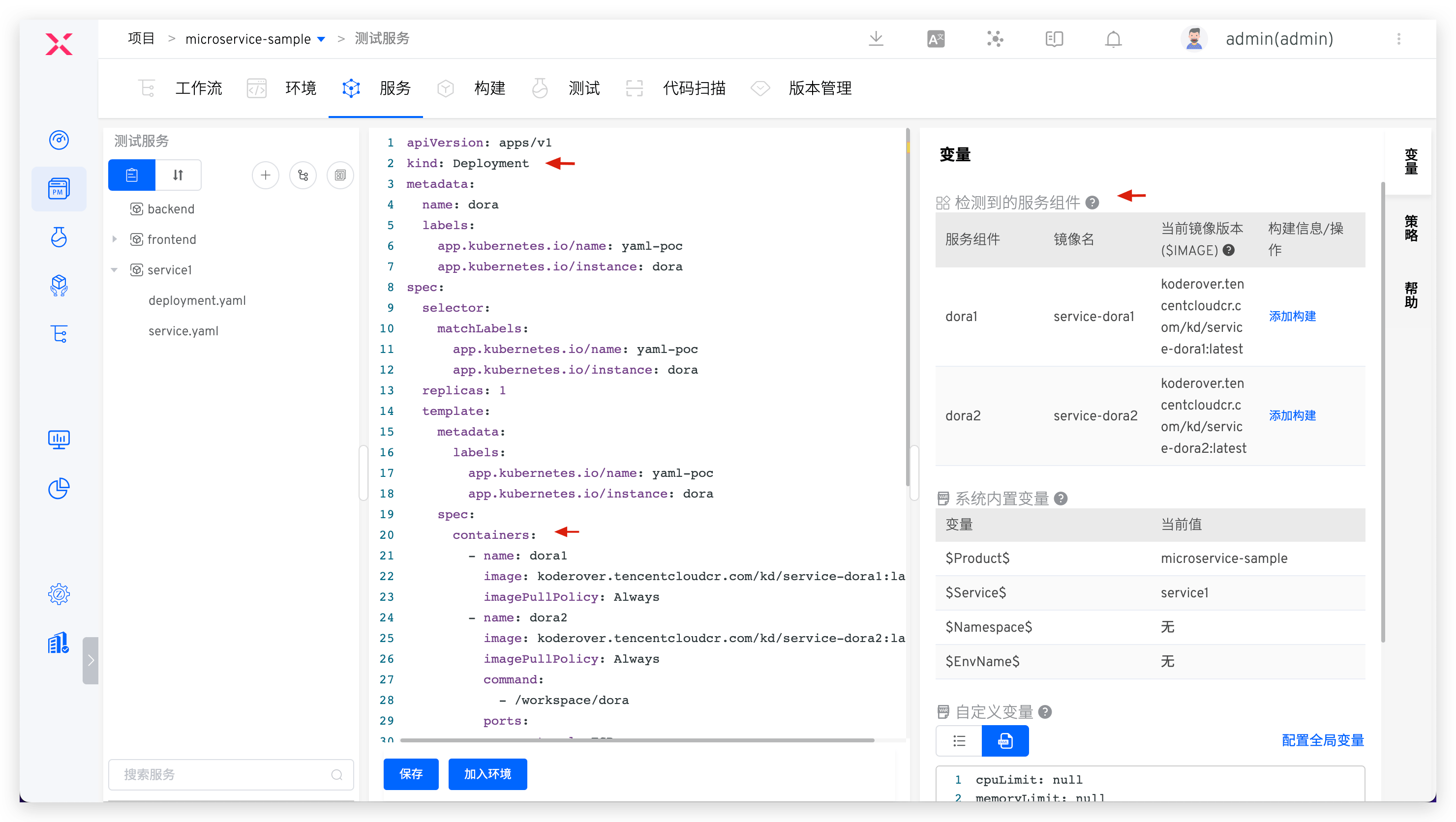
The information of the service component comes from the Deployment/Statefulset/CronJob/InitContainer resources in the service K8s YAML configuration. The following figure is an example:
Service Component: The name of the container in the Deployment/StatefulSet/CronJob/InitContainer resourceCurrent Image Version: The image information of the service componentImage Name: Parsed fromCurrent Image Version, the format is:Repository Address/Namespace/Image Name:Tag Name
# K8s Helm Chart Project
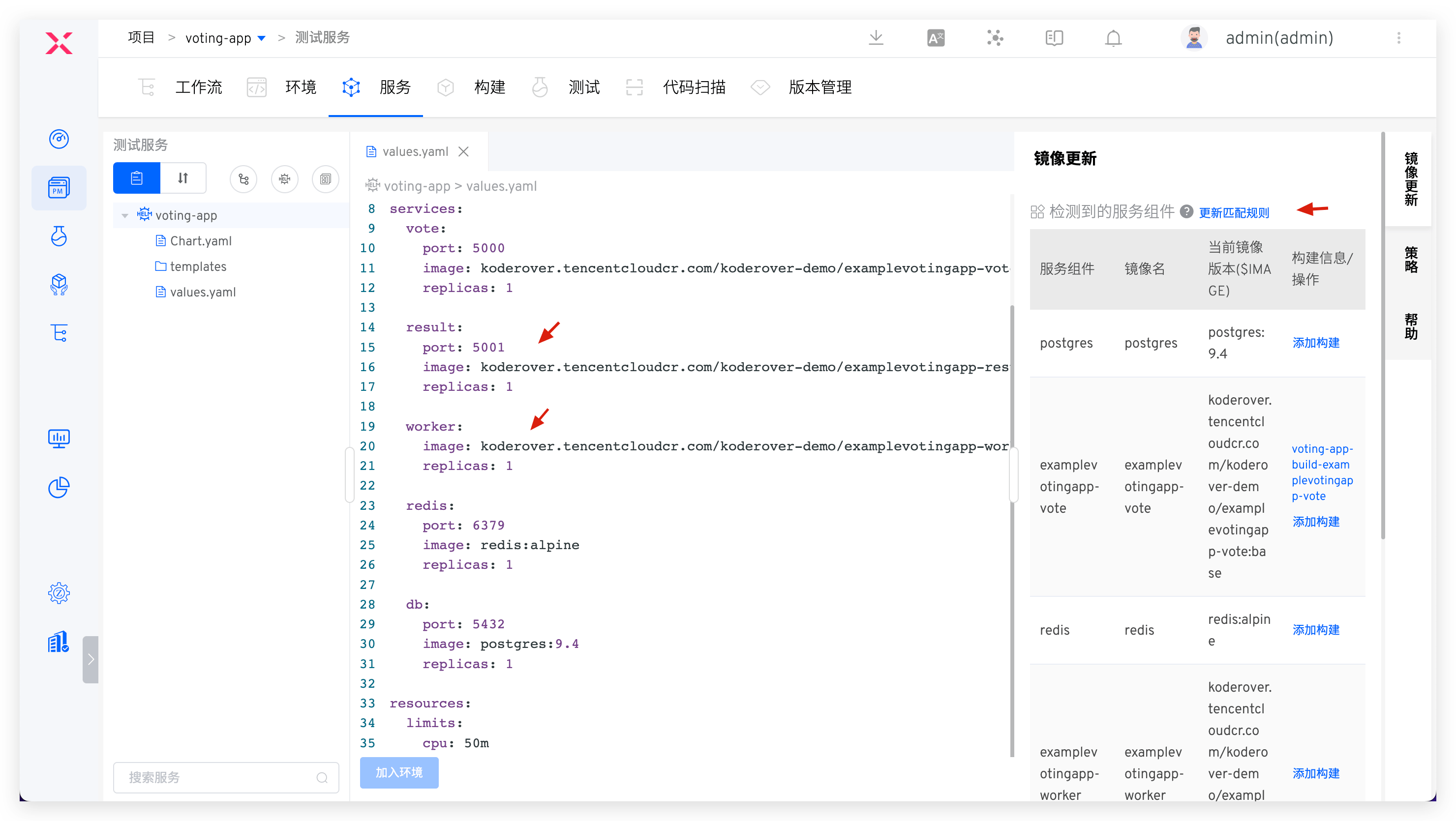
The information of the service component comes from the service's values.yaml file content, as shown in the following figure:
Current Image Version: The system analyzes the file according to certain rules to obtain mirror information values.yaml For the analysis rules, see parse rulesService Component: The same asImage NameImage Name: Parsed fromCurrent Image Version, the format is:Repository Address/Namespace/Image Name:Tag Name
# Service Component Parsing Rules
Includes built-in rules and custom rules. After importing the Helm Chart configuration file, the system will parse the mirrored content in the vaues.yaml file according to the built-in rules. When the built-in rules do not meet the needs, you can click Update Matching Rules on the right side of the service component to customize the mirror resolution rules.
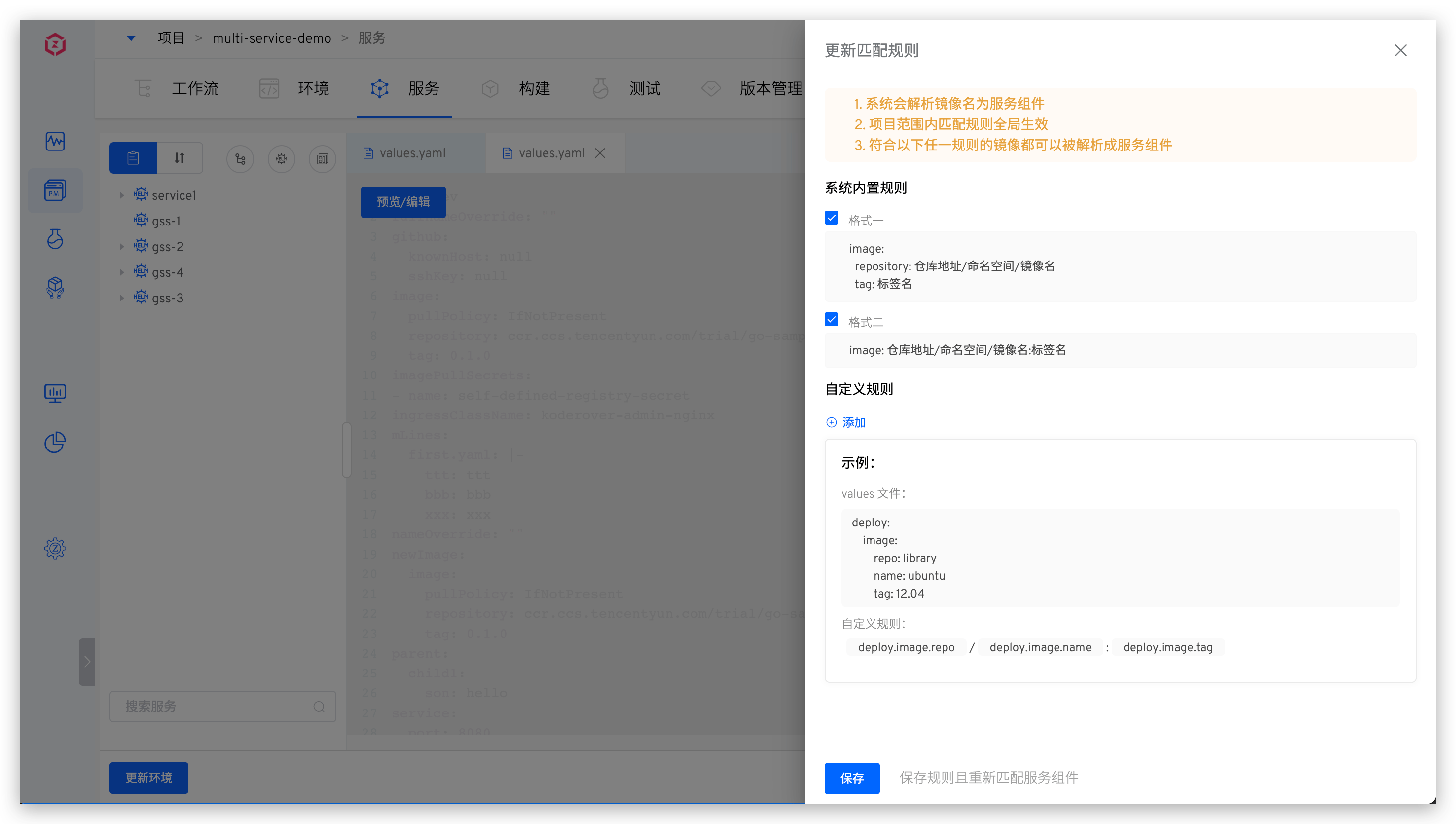
Built-in Rules
- There is the following code segment structure in values.yaml , splicing
image.repository:image.tagas the mirror version of this component, and the deployment version and update of the service are both centered aroundimage.repositoryandimage.tag. In this example, it is:koderover.tencentcloudcr.com/koderover-demo/backend:latest.
Details
# Helm Chart values.yaml Demo
key1: value1
key2: value2
key3:
  key4: value4
  key5:
    image:
      repository: "koderover.tencentcloudcr.com/koderover-demo/backend"
      tag: "latest"
  key6:
    ...
...
2
3
4
5
6
7
8
9
10
11
12
- The value of the
imagefield in values.yaml is the mirror information, and the deployment version and update of the service are both aroundimage. In this example,koderover.tencentcloudcr.com/koderover-demo/backend:latestis.
Details
# Helm Chart values.yaml Demo
key1: value1
key2: value2
key3:
  key4: value4
  key5:
    image: "koderover.tencentcloudcr.com/koderover-demo/backend:latest"
  key6:
    ...
...
2
3
4
5
6
7
8
9
10
Custom Rules
- Use the absolute path of the key to parse the component's image information. In the following example, fill in
deploy.image.repo/deploy.image.project/deploy.image.name:deploy.image.tagin the custom rule.
Details
key1: value1
key2: value2
...
deploy:
  image:
    repo: library
    project: public
    name: ubuntu
    tag: 20.04
2
3
4
5
6
7
8
9
- Use the relative path of the key to parse the image information of the service component. In the following example, fill in
repo,name, andtagin the repository address, image name, and tag name of the custom rule.
Details
key1: value1
key2: value2
...
deploy:
  image:
    repo: library
    name: ubuntu
    tag: 20.04
2
3
4
5
6
7
8
- A single parsing rule can be used to parse multiple service components. In the following example, if you fill in
repo,name, andtagin the repository address, image name, and tag name of the custom rule, you can parse the images ofservice1andservice2aslibrary/service1:v1andlibrary/service2:v2, respectively.
Details
key1: value1
key2: value2
...
deploy:
  service1:
    repo: library
    name: service1
    tag: v1
  service2:
    repo: library
    name: service2
    tag: v2
2
3
4
5
6
7
8
9
10
11
12
- The
values.yamlfile can reuse certain keys. In the following example, if you fill inpublic.repoInfofor the repository address,name:tagfor the image name and tag name in the custom rule, the images forservice1andservice2will be parsed aslibrary/service1:v1andlibrary/service2:v2, respectively.
Details
key1: value1
key2: value2
...
public:
  repoInfo: library
deploy:
  service1:
    name: service1
    tag: v1
  service2:
    name: service2
    tag: v2
2
3
4
5
6
7
8
9
10
11
12
- The
NamespaceandTag Namein the custom rule are optional, and you can fill in either theRepository Addressor theImage Name. In the following example, filling indeploy.image.namein the repository address or image name of the custom rule is sufficient
Details
deploy:
  image:
    name: library/ubuntu:12.04
2
3
# K8s Managed Project
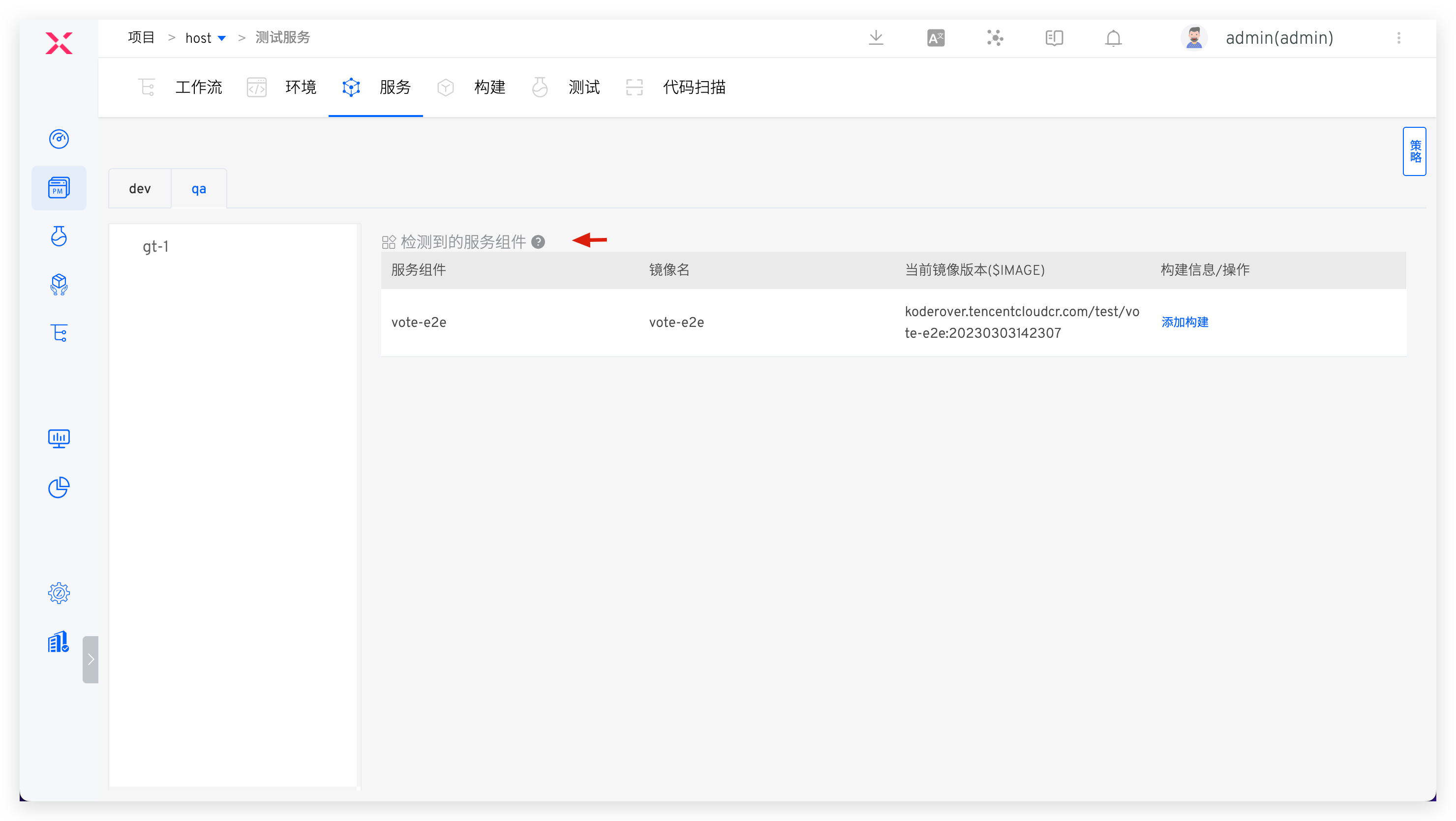
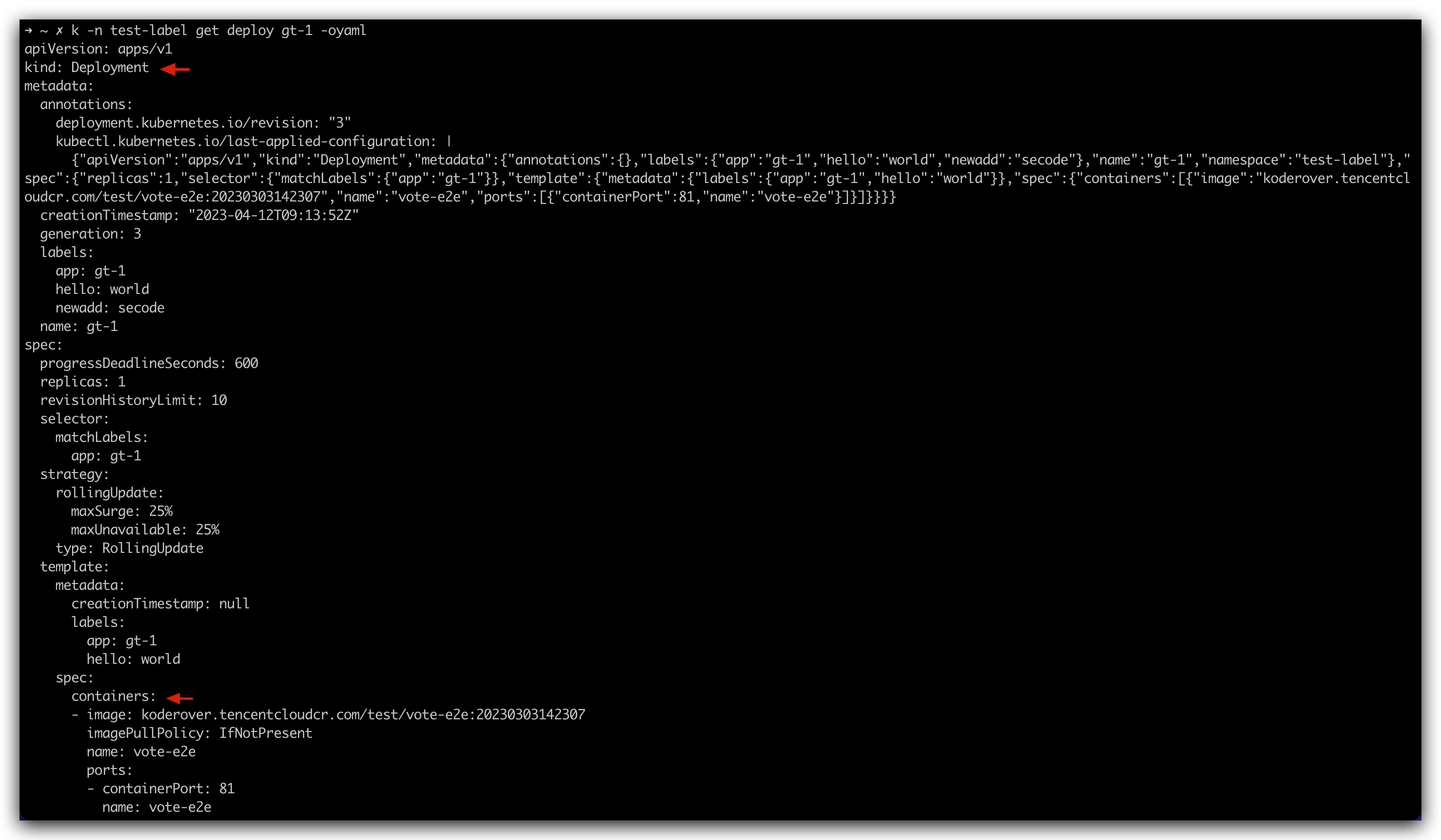
The information of the service component comes from the managed service instances. Currently, it supports Deployment/Statefulset/CronJob/InitContainer type service instances. The following figure is an example:
Service Component: The name of the container in the Deployment/StatefulSet/CronJob/InitContainer instanceCurrent Image Version: The image version of the managed service instance resource, i.e., the image informationImage Name: Parsed fromCurrent Image Version, the format is:Repository Address/Namespace/Image Name:Tag Name
# How to Update Service Components
There are three ways to update service components:
- After configuring the build for the service component, you can select the corresponding service component to update it when running the workflow. See the following configuration documents:
- Directly modify the service component image in the environment to update it, see Service instance operation .
- Update service components by modifying the mirror information in the service configuration file and updating the service in the environment. See Update service .

